

Manage environments
Update an environment you look after in Curade Mini, renew its access token, switch CLEO on with an AI provider and choose its members.
On this page
An Admin looks after the environments assigned to them in Environment Management, in the console: their connection to your organisation's monitoring platform, their members and CLEO. Core Consulting creates and deletes environments.


Before you begin
- You are an Admin, and the environment is assigned to you.
- You have a new access token from your organisation's monitoring platform, with read access only, when the connection needs renewing. The app never writes anything back.
- Optional: the AI provider your organisation chose for CLEO, the model's exact name as the provider lists it, and an API key for it.
Steps
- Open Console from the drawer.
- Tap Environment Management and open the environment.
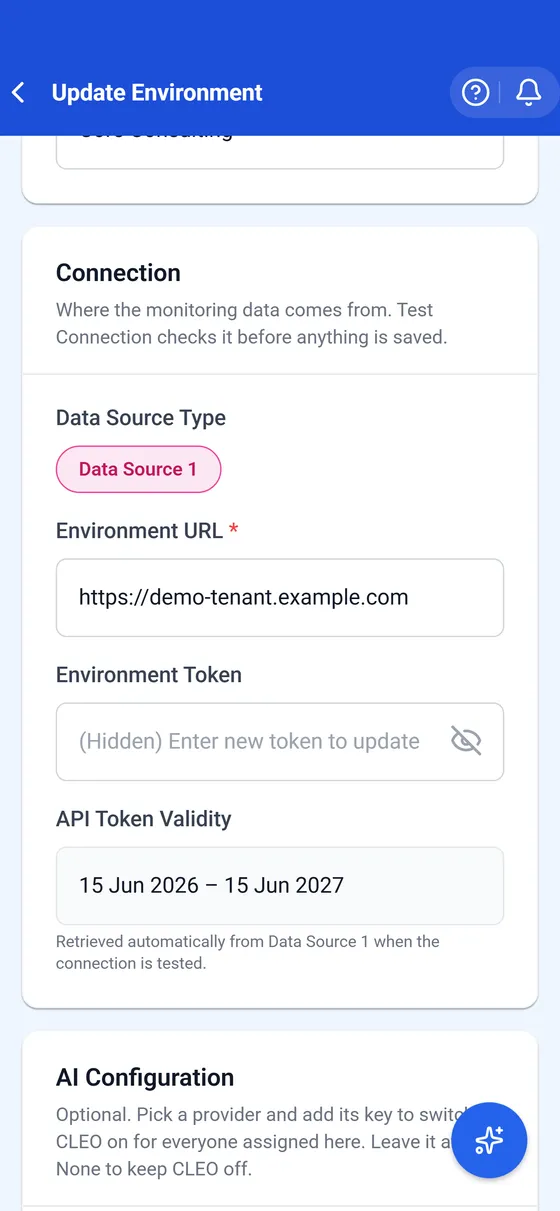
- Under Connection, paste the new access token into Environment Token when it needs renewing.
- Under AI Configuration, pick the AI Provider, then fill in AI Model and AI API Key to switch CLEO on.
- Under Assign Users, tick who may open the environment.
- Tap Test Connection. It checks the address and the token against the live environment.
- Tap Update Environment once the test passes.
Result
The environment reads through the updated connection, and everyone assigned to it gets the change straight away. Curade Mini never shows a stored key again: it keeps the key encrypted. API Token Validity shows the dates read from the new token, so extending access means issuing a token with a later expiry. With a provider, a model and a key in place, CLEO is on for everyone in the environment.
Some providers ask for one more thing first: a tick confirming the key's account keeps CLEO's messages out of the provider's model training. The model and key boxes stay locked until it is ticked, and How to find a model shows where the provider lists its model names.
Other changes
- Update Environment saves later changes to its connection, members and CLEO, from Environment Management.
- A suspension by Core Consulting closes the environment to its members until it is lifted. A suspended environment is deleted no later than 30 days after the suspension unless it is lifted first.
- Core Consulting deletes environments, with everything in them, and connects new ones.
- Core Consulting switches monitoring alerts on or off for an environment once the organisation agrees.
This page describes Curade Mini 1.0.0.