

Send notifications
Send a notification from the Curade Mini console to the people in your environments, by environment or by person, in one language or all.
On this page
An Admin can send a notification to the people in the environments assigned to them. It arrives at once in their inbox and as a push, and is never emailed.

Before you begin
- Write the message in the language your audience reads the app in. The content goes out exactly as typed and is never translated.
Steps
- Open Console from the drawer.
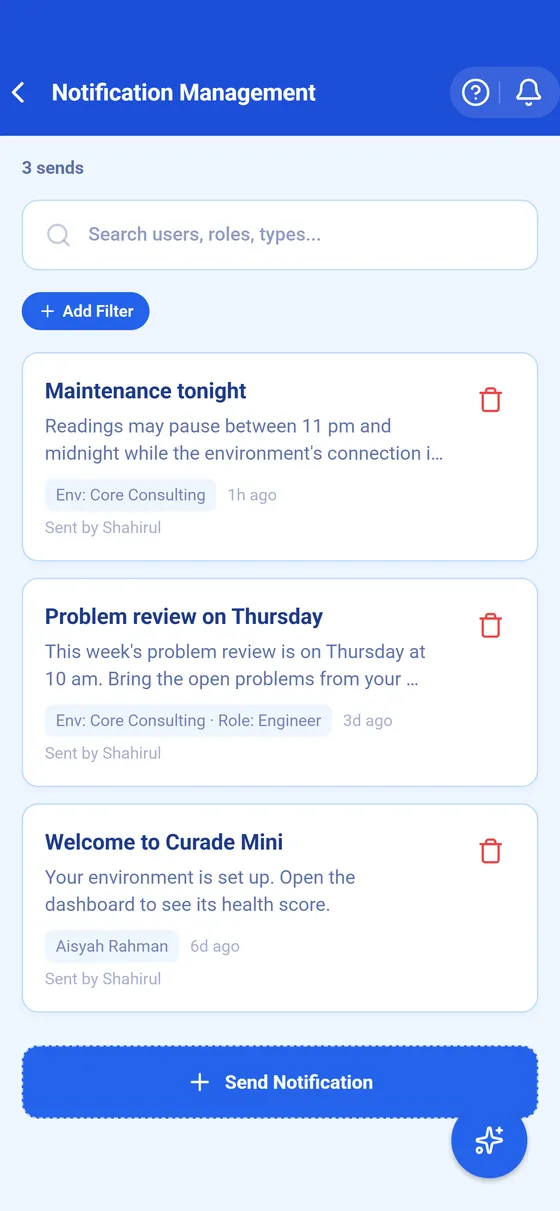
- Tap Notification Management.
- Tap Send Notification to open the form.
- Under Message, type the Title and the Content.
- Under Targeting, pick Environment and choose environments, narrowing to a role if you want, or pick User and choose people.
- Under Language, pick a language to reach only the people reading the app in it, or leave it empty to reach everyone.
- Tap Send Notification.
Result
The notification goes out straight away; there is no draft and no scheduled send. When a language is picked, the form says how many of your audience it leaves out, and refuses a send that would reach nobody.
The list under Notification Management is the history of what was sent and to whom. Deleting a sent notification removes it from the console and from every recipient's inbox, though a push banner already on their phone cannot be recalled.
This page describes Curade Mini 1.0.0.