Notifications
The bell in Curade Mini opens your inbox of alerts, notices and messages, and Curade Mini emails the notices the service writes, with pushes too.
On this page
The bell at the top of every monitoring page holds your notifications, which are your monitoring alerts, the notices the service writes and messages from an admin, and Curade Mini emails the notices too. Engineers and Admins both see the bell.

What the bell shows
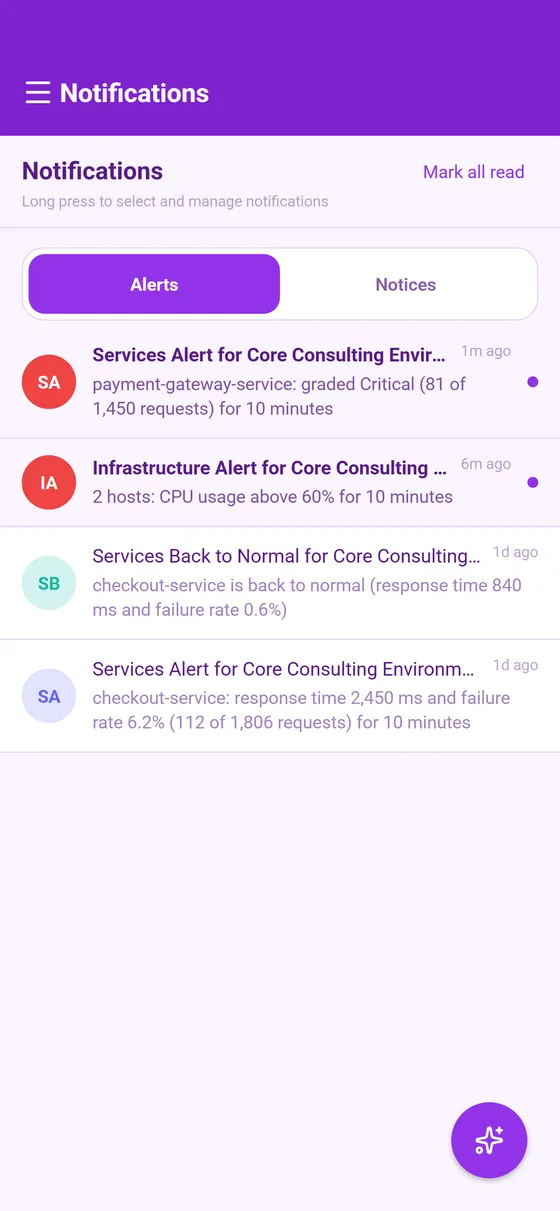
A red dot on the bell means something unread is waiting. Opened, the bell shows your notification inbox. Once monitoring alerts are on for your account, the inbox has two tabs: Alerts for your monitoring alerts and Notices for everything else, so a burst of alerts never buries a warning. Each tab counts its own unread notifications.
- Tap a notification to read it in full, and swipe a row to delete it.
- Mark all read clears every unread notification in the tab in view.
- Pin keeps an important notification at the top, up to a limit counted across the whole inbox.
Emails
Curade Mini also sends email, to the address your account signs in with:
- When the service writes you a notice, you get it by email too: the welcome message, the warnings before an access token lapses, the warnings before an unused account or environment is deleted (30 days, 7 days and 1 day ahead), and the messages about a suspension or a deletion.
- A password reset code goes to the address you give on the sign in screen (Sign in).
Messages an admin composes and your monitoring alerts arrive in the app and as a push only, never by email. Deleting a notification in the app does not recall its email.
Links on notices
A notice the service writes carries a link to what it is about, such as Go to Infrastructure on a monitoring alert. The link is checked against your access each time you open it, so it never opens a screen you can no longer use. When it cannot open, the notice says why:
- This link has expired: a monitoring alert's link lasts 24 hours.
- This has been resolved: the situation is over, such as a token that has been renewed.
- This no longer exists: what it was about has been deleted.
- Not available with your access: your role or your environments no longer reach it.
- The environment is suspended, or The environment's monitoring token has lapsed.
- Update the app to open this: the link is newer than your version of the app.
Language
A notice the service writes is worded when you read it, so it follows the app's language, even for a notice that arrived before you switched. A message an admin composed is delivered exactly as written, and a send aimed at one language reaches only the accounts reading the app in it.
Needs your attention
When the app opens on your account, a Needs your attention notice can open over the screen with what concerns you right now, most urgent first: your own pending deletion request, an environment of yours that is suspended or about to be deleted for lack of use, and for those who renew it, an environment's access token that has lapsed or is about to. It lists three at most, and Got it puts it away. An item you have seen stays quiet for a few days, and goes for good once it no longer applies.
Push notifications
The app asks your phone for permission to show notifications the first time it opens, and registers the device once you allow it. Pushes reach the account signed in on the device, once it has agreed to the current privacy policy and terms of use. Signing out stops them on that device and clears the banners already in its notification tray. Push notifications in Settings switches every kind of push off or on (Notifications and push).
This page describes Curade Mini 1.0.0.