
CLEOBETA
CLEO, Curade Mini's built in assistant, answers questions about what is on screen and how the app works, and explains readings with Cluemetry.
On this page
CLEO, the Core Language Environment Orchestrator, is Curade Mini's built in assistant, made by Core Consulting. Ask it about what is on screen in plain words and it answers from the same monitoring data and from how the app works. Engineers and Admins both open it. It carries a BETA badge while it is still being tested.


Where to find it
Open CLEO from the drawer, or tap the round sparkle button at the bottom right of any screen. The sparkle button starts a conversation that already knows what is on the page, and Chat History holds your earlier ones.
What CLEO knows
CLEO answers from the page you ask on and the environment's monitoring data: the environment, the time window, the filters and the values on screen go with every message, and CLEO looks up more as it works. So "why is this red?" works without naming anything, and CLEO also knows how the app itself works.
CLEO reads and explains. It cannot change anything: it never invites a user, edits an environment or sends a notification, and its replies make no decisions about anyone.
It understands time in plain words: today runs from midnight up to now, yesterday is the whole previous day and this week starts on Monday. Times it writes back are in your phone's own time zone.
Asking
- A new chat offers starting questions, such as "Is my infrastructure healthy?", which you can send as they are or change first. An answer can also end with follow-up suggestions.
- You can edit a question you sent, and CLEO answers it again.
- When CLEO needs more detail to go on, it asks with a short form. Fill it in and tap Submit.
What an answer holds
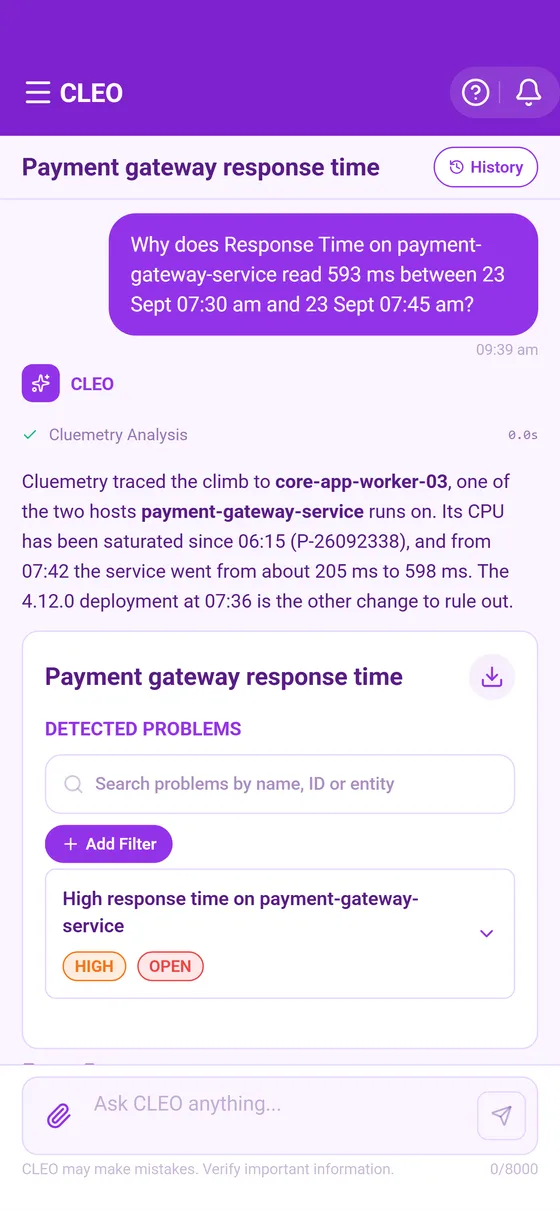
- An answer about a problem can come as a card, with its Summary, Affected Entities, Suspected Root Cause, Analysis Process and Remediation Steps.
- A line in the answer shows what CLEO looked up while it worked.
CLEO can make mistakes, so verify anything important before you act on it.
Attaching files
A question can carry files from the paperclip beside the message box: photos, PDFs, or CSV, plain text or Markdown files. Their contents go to the AI provider with your question, so a file should never hold passwords or other credentials. Before each pick, an Attachment Notice says so, and Continue opens the picker.
When CLEO searches logs, personal details in the log lines are replaced before CLEO reads them: email addresses, network addresses, phone numbers, Malaysian identity card numbers, card numbers and sign in tokens. The logs themselves are untouched.
Your chats
Chat History lists the chats you can see, with a search, a filter by visibility and a choice of newest or oldest first, and a filter by who started each one. On a chat of your own, Rename renames it, Clone copies it into a new chat, and deleting its first message removes it. Anyone who can see a chat can clone it.
| Visibility | What everyone else in the environment can do |
|---|---|
| Public | Read the chat, reply in it, rename it and delete it |
| Read Only | Read the chat |
| Private | Nothing; only you see it |
A new chat, and every clone, starts Private, so Change Visibility is how you share one.
In a chat several people wrote in, each turn is labelled with who typed it, and a turn from a closed account reads Former member.
Private is private between colleagues, not from the people who run the environment: an Admin reads the chats of the users they administer in their environments, and Core Consulting staff who run the service can read every chat. Reading is all they can do, and a clone copies the chat into their own account.
Switching CLEO on
CLEO answers in an environment once an admin has set up an AI provider for it under AI Configuration in the console (Manage environments). Until then, the sparkle button looks faded and shows CLEO Is Off; an Engineer asks their Admin.
Asking why
Ask CLEO about this, at the foot of every explanation, opens CLEO with a question already in the message box and the explanation handed over, for that exact interval or item. Nothing is sent until you tap send. Asked why something reads the way it does, CLEO checks with Cluemetry and shows Cluemetry Analysis while it works (Cluemetry).
Allowing the AI provider
CLEO writes its answers with the AI provider your organisation chose for the environment. Before your first message to a provider, CLEO names it, says what goes to it (what you type and attach, what is on screen and the monitoring data CLEO looks up) and that it may handle it outside Malaysia. Allow sends the message and is remembered for that provider on every device. Not Now sends nothing.
For some providers, CLEO also waits until an admin confirms in the console that the provider account keeps CLEO's messages out of the provider's model training. Until then a notice above the message box says CLEO is paused in that environment.
This page describes Curade Mini 1.0.0.